
How to Stop Scam Links in Your Discord Server (2026)
Scam spam no longer comes from throwaway alts, it comes from trusted members whose accounts were stolen. Here is the layered setup that actually stops it: AutoMod, server settings, behavioural rules and the cleanup afterwards.

Most advice about scam links in Discord servers is five years out of date. It tells you to block a list of bad domains and raise your verification level, which was reasonable when the spam came from an account created eleven minutes ago.
That is not where it comes from now. In June 2026 alone, one large Discord protection service identified 160,000 compromised accounts across the servers it protects, triple the number from April. The account posting a crypto casino link in your general channel is very often a member who has been with you for two years, has roles, and has no idea it is happening. Their session token was stolen by malware, and their account is being used as a distribution node. We covered that mechanism in detail in the MrBeast Discord scam breakdown.
That changes what a working defence looks like. Here is the setup, in the order you should build it.
Layer 1: turn on Discord AutoMod
AutoMod is free, it is built in, and it runs before the message is posted. It should be on in every server regardless of what else you use. Server Settings > AutoMod.
Three things worth enabling immediately:
- Suspicious link filter. Discord maintains its own list of known phishing and malware domains and blocks messages containing them. Requires a Community-enabled server.
- Block spam content. Catches the crude, high-volume patterns.
- Block custom words. Add the recurring lure vocabulary:
free nitro,steam gift,giving away,claim your reward,airdrop,promo code.
AutoMod also accepts regex, which is worth using for domain shapes rather than exact domains, for example a pattern matching disc[o0]rd
followed by anything that is not discord.com or discord.gift.
What AutoMod will not do
Be clear-eyed about the ceiling here, because this is exactly where most servers stop and then wonder why they still get hit.
It cannot read images. The dominant format in 2026 is a designed graphic with the URL burned into the picture. There is no text for a keyword filter to match. That same service deleted over four million fraudulent images in June, and the count of unique images grew 95% since February, meaning attackers regenerate fresh artwork constantly.
Its domain list is always behind. New domains are registered faster than any blocklist updates. A blocklist catches yesterday's campaign.
It has no memory across channels. AutoMod evaluates a message. It does not know that the same member posted the same thing in four other channels nine seconds ago, which is the single clearest signal that an account has been taken over.
So AutoMod is your floor, not your defence.
Layer 2: tighten the server itself
Cheap, one-time settings that remove whole categories of attack.
- Verification level. Set it to at least Medium, or High if you can tolerate the friction. High requires a member to be in the server for 10 minutes before they can type.
- Permissions audit.
@everyoneshould not have Embed Links or Attach Files in every channel by default. Restrict them to channels where they are actually needed, or to a role that members earn. This alone kills image spam in most of your server. - Disable DMs from server members in the safety setup, so a compromised member cannot quietly work through your member list.
- Onboarding or a rules gate, so accounts have to do something deliberate before they can post.
None of this stops a compromised long-standing member. It stops everything below that tier, which is most of the noise.
Layer 3: detect the behaviour, not the link
This is the layer that actually catches account takeovers, and the reasoning behind it is simple.
An attacker can regenerate the image every hour. They can rotate the domain every hour. They can rewrite the caption endlessly. What they cannot change is the shape of the delivery, because the whole point is volume: get the message into every channel, in every server, before anyone notices. That burst does not look like conversation, and it never will.
So the rule you want is not "block this link". It is "no member posts the same thing in four channels in ten seconds".
In Fenrai you build this in Dashboard > Moderation > Rules, as a trigger plus conditions plus an action. These are the rules worth having, in priority order.
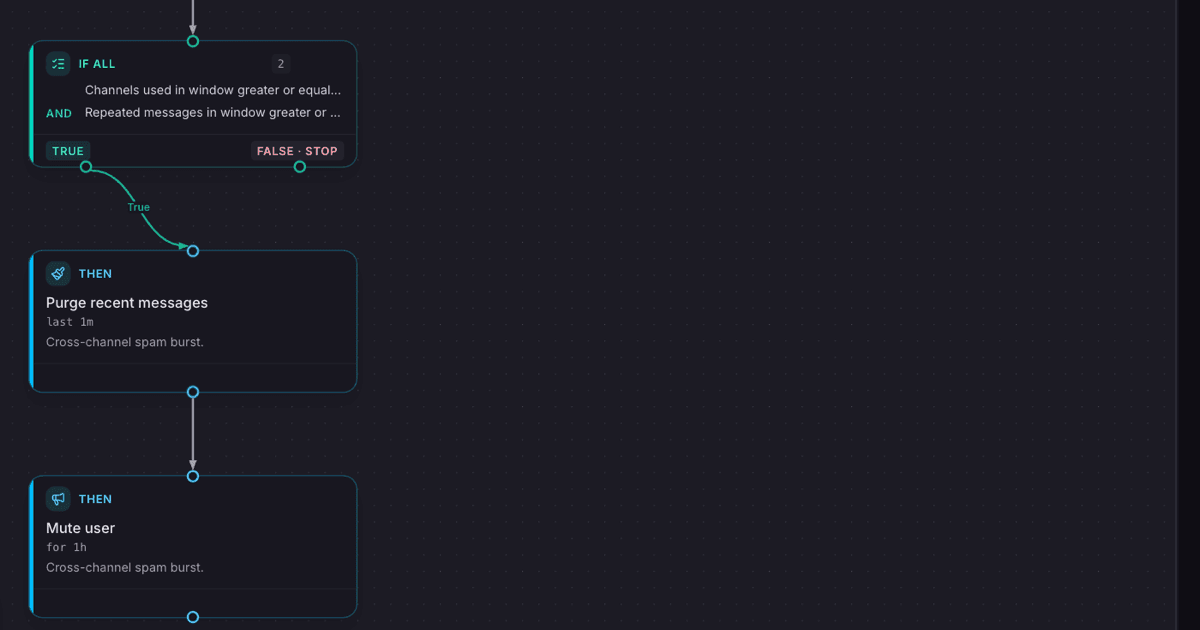
The cross-channel burst rule
The highest-value rule in the whole setup, and the one Fenrai ships as a template. Pick Catch cross-channel spam when you create a rule and you get this:
- Trigger: message sent
- Conditions: channels used in window at least 3 within
10s, and repeated messages in window at least 3 within10s - Actions: purge recent messages from the last
1m, then mute for1h
Purging matters as much as the mute. A mute stops the next message, but if you leave the posted images up, the links stay live for everyone who scrolls back. Purge and mute together are what ends the incident.
One tweak worth making to the template: raise the mute from 1h to something like 12h.
An hour expires while the owner is still asleep and the malware is still on their machine,
so the burst simply resumes. A longer mute forces them to come and talk to you, which is
the point, because they need to be told their machine is compromised.
The image plus link rule
Catches the image-only variants that AutoMod is blind to.
- Trigger: message sent
- Conditions: has image, has link, and messages in window above your server's normal chat rate
- Action: delete and log
Run this one on log only for a few days first and read what it catches. Every server has a different baseline for how much people post images with links, and a rule tuned for someone else's server will eat your memes.
The new account rule
Still worth having, because the bottom tier of spam has not gone away. This one also ships as a template, Hold back new accounts.
- Trigger: message sent
- Conditions: account age at most 7 days, and has link
- Action: delete the message
Note this is account age, not time since join. An attacker who registers a fresh account and waits a day in your server defeats a join-time rule and not this one.
The lure phrase rule
- Trigger: message sent
- Condition: content matches a pattern covering the recurring wording
- Action: delete and log
Last, not first. It duplicates part of what AutoMod does and it misses images entirely. Its real value is that it lands in your case log with a rule name attached, so you can see the campaign wording change over time.
Layer 4: the cleanup is part of the defence
Two settings in Dashboard > Moderation > General decide whether your team can actually see what is happening: the channel every action is reported to, and whether a warned member also gets a DM.
Send everything to a private mod channel. What you are looking for in that log is the pattern that distinguishes a compromise from a genuinely malicious member: a burst at 4am, from an account with a clean two-year history, that stops as suddenly as it started. That is a victim, not an attacker.
Handle it accordingly:
- Mute and purge, which your rules already did automatically.
- Tell them what happened and point them at the recovery steps, the critical one being Discord Settings > Devices > Log out of all known devices, which is what invalidates the stolen token. A password change alone does not.
- Unmute once they confirm they have cleaned the machine and logged out everywhere.
- Ban only on a repeat after recovery.
If your only move is a ban, you lose a member every time and the attacker loses nothing.
What to skip
Do not build your defence on a domain blocklist. Maintaining one is a treadmill you lose. Let Discord's suspicious link filter handle the known-bad list and spend your effort on behaviour.
Do not stack four anti-spam bots. They fight each other, you get double punishments, and nobody can tell which bot did what when something goes wrong. One AutoMod layer plus one rules engine is the whole answer.
Do not lock the server down permanently after an incident. Lockdown is a response to an active raid, not a configuration. Servers that stay in lockdown mode lose the members they were protecting.
The minimum viable setup
If you do nothing else, do these four things:
- AutoMod on, with the suspicious link filter and a custom word list.
- Verification level Medium or High, and Attach Files removed from
@everyoneoutside the channels that need it. - The Catch cross-channel spam template, with the mute raised to
12h. - A mod log channel that everything reports into.
That covers the throwaway alts, the image spam and the compromised trusted member, which is every shape this attack currently takes.
Full reference for triggers, conditions, actions and duration syntax is in the moderation docs.
Common questions
Does Discord AutoMod block scam links by itself? Partly. The suspicious link filter blocks domains already on Discord's known-bad list, which means it is effective against old campaigns and blind to new ones. It also cannot read text inside images.
Why is a two-year member spamming crypto links? Their account was almost certainly compromised by infostealer malware that took their session token. They are not doing it and usually do not know it is happening.
Should I ban members who post scam links? Mute and purge first, then check the account's history. A clean long-standing account is a compromise. Ban is for accounts that come back and do it again.
How do I stop image spam specifically?
Two ways that work: remove Attach Files from @everyone in channels that do not need it,
and use a behavioural rule on has image plus burst activity. Keyword filters cannot help.
Will these rules punish normal members? Not if you tune them. Start every new rule on log only, watch it for a few days, and only then give it an action. That applies to every rule above except the cross-channel burst one, which almost never has false positives because normal people do not paste identical text into four channels in ten seconds.
More Articles
The MrBeast Discord Scam: Why Your Friend's Account Is Sending You Casino Links
A friend DMs you a MrBeast giveaway. They did not send it. Here is how infostealer malware takes over Discord accounts without a password, what to do if yours sent the spam, and how to stop it spreading in your server.
July 31, 2026
Discord AutoMod AI: What It Catches, and What It Still Cannot See
AutoMod AI reads context instead of matching keywords, which is a real upgrade. It is also blind to images, has no memory across messages, and does not know who the member is. Here is where the line sits and what belongs on the other side of it.
August 6, 2026
How to Protect a Discord Server From Raids (2026 Playbook)
Join floods, nukes and mass-DM waves need different answers, and most servers only prepare for the first one. Here is the configuration to do before, the rules that detect a raid in seconds, and the cleanup that decides whether the server recovers.
August 4, 2026